Understanding Ethernet Cards and Their Role

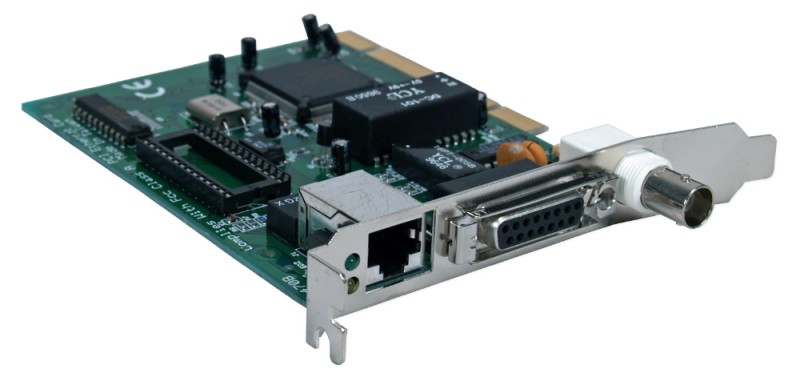
An Ethernet card, also known as a network interface card (NIC), is a piece of computer hardware that allows a device such as a computer to connect to a computer network that uses the Ethernet standards. Ethernet is a common networking technology used to connect devices locally within homes, offices, or other buildings.
Types of network interface card
There are different types of network interface card available for different use cases and connection speeds:
- Fast Ethernet: One of the earliest and most common Ethernet standards is 100BASE-TX, also known as Fast Ethernet. It provides connection speeds up to 100 megabits per second (Mbps) over standard Category 5 cable. Many older network interface card and interfaces support only Fast Ethernet.
- Gigabit Ethernet: As network usage and file sizes grew, Gigabit Ethernet Card was developed to provide speeds up to 1,000 Mbps or 1 gigabit per second (Gbps) over Category 5e or higher cabling. Nearly all modern network interface card support Gigabit Ethernet as the baseline standard.
- 10 Gigabit Ethernet: For high-performance networking in data centers and large organizations, 10 Gigabit Ethernet provides connection speeds up to 10,000 Mbps or 10 Gbps. Special fiber optic or Category 6a cabling is required to reach these speeds. 10 Gigabit network interface card tend to be more expensive than standard Gigabit network interface card.
- Wireless Ethernet: With the growth of notebook computers and mobile devices, wireless 802.11 standards like Wi-Fi also provide Ethernet-compatible networking over radio waves instead of cables. Wireless network interface card, also called Wi-Fi cards, allow cable-free connectivity.
- Multigigabit Ethernet: A newer emerging standard provides even higher speeds ranging from 2.5Gbps to 5Gbps and sometimes beyond using existing cabling. These “multigig” network interface card offer greater performance for power users.
Physical Form Factors for Ethernet Cards
Network interface card are available in a variety of physical form factors to fit the wide range of devices they connect:
- PCI and PCIe Cards: Internal expansion cards in the PCI and PCI Express formats are commonly used in desktop computers and servers. They plug directly into the motherboard.
- Mini PCIe Cards: Often used in slim laptop computers, mini PCIe cards have a smaller footprint than standard PCIe cards.
- M.2 Cards: The M.2 form factor fits into an M.2 slot on newer motherboards for a very compact solution. Often used for Wireless LAN cards.
- USB Adapters: External USB Ethernet adapters in the form of a small dongle allow any USB-equipped device to connect over a network cable. Often used with laptops.
- Network Interface Controllers (NICs): Embedded directly on the motherboard, a network controller chip provides Ethernet connectivity without needing an expansion card. Common on small devices.
Configuring and Managing Ethernet Cards
For an network interface card to function properly, it needs an IP address and other networking settings. On Windows and macOS, this can commonly be done through the Network and Sharing Center or System Preferences respectively.
The network interface card may require installing drivers from the manufacturer’s website. Web browser-based utilities from card vendors can also help configure advanced features.
Administrators often rely on command line tools like ipconfig on Windows or ifconfig on Linux/macOS to view essential settings like the card’s MAC address. Network troubleshooting often begins by examining network interface card statuses and link states.
Future of Ethernet Technology
With network demands continuously growing, higher-speed Ethernet standards like 25Gb Ethernet, 40GbE, and 100GbE are in development. Multi-gigabit Wi-Fi is also emerging. Faster interconnect technologies such as InfiniBand further push performance boundaries.
At the same time, Wi-Fi, 5G cellular, and other wireless technologies continue expanding our network horizons beyond simple Ethernet cables. But wired Ethernet will likely remain theWorkhorse connectivity method poweringLANs andserver infrastructure for the foreseeable future. As devices get faster, Ethernet keeps evolving while continuing its role as the networking protocol connecting everything together.
Get more insights on Ethernet Card
About Author:
Money Singh is a seasoned content writer with over four years of experience in the market research sector. Her expertise spans various industries, including food and beverages, biotechnology, chemical and materials, defense and aerospace, consumer goods, etc. (https://www.linkedin.com/in/money-singh-590844163)